TinyMCE AI JWT Authentication
TinyMCE AI requires JWT (JSON Web Token) authentication when using the Tiny Cloud service. JWT authentication provides secure, user-specific access to TinyMCE AI features. Each JWT token contains claims that identify the user and specify which AI features they can access.
|
This page covers JWT authentication for the Tiny Cloud-hosted AI service, where the |
TinyMCE recommends using the libraries listed on jwt.io/libraries to create JWT tokens. These libraries support the algorithms required by TinyMCE AI. For details on supported algorithms, see Supported Algorithms.
Trial: demo identity service
During a Tiny Cloud trial, a demo identity service is available for the TinyMCE AI plugin. This allows trying the plugin without setting up a custom token endpoint, for the duration of the trial. The demo service assigns a random session and user ID to the end user, then generates a JWT for that user. This prevents users from viewing each other’s conversation history.
Quick start
The following is the simplest way to use the demo identity service. Replace {apiKey} with the trial API key from the Customer Portal.
|
In production, the user session should be scoped to the page, not a specific TinyMCE instance. This example places it in the |
tinymce.init({
  selector: "textarea",
  plugins: "tinymceai",
  toolbar: "tinymceai-chat tinymceai-review tinymceai-quickactions",
  sidebar_show: 'tinymceai-chat',
  tinymceai_token_provider: async () => {
	await fetch(`https://demo.api.tiny.cloud/1/no-api-key/auth/random`, { method: "POST", credentials: "include" });
	return await fetch(`https://demo.api.tiny.cloud/1/no-api-key/jwt/tinymceai`, { credentials: "include" })
	  .then(resp => resp.text())
	  .then(token => ({ token }))
  }
});
Realistic usage
In production, user and session management typically happens at the page level. This example gives a more realistic pattern for using the demo identity service’s two endpoints:
// Establish a session with the demo identity service (cookies sent on same-site requests).
const isLoggedIn = fetch(`https://demo.api.tiny.cloud/1/no-api-key/auth/random`, { method: "POST", credentials: "include" });

tinymce.init({
  selector: "textarea",
  plugins: "tinymceai",
  toolbar: "tinymceai-chat tinymceai-review tinymceai-quickactions",
  sidebar_show: 'tinymceai-chat',
  tinymceai_token_provider: async () => {
	// Wait for the session request so the JWT endpoint receives the session cookie.
	await isLoggedIn;
	// Return a JWT string in the shape the AI plugin expects: { token }.
	return await fetch(`https://demo.api.tiny.cloud/1/no-api-key/jwt/tinymceai`, { credentials: "include" })
	  .then(resp => resp.text())
	  .then(token => ({ token }))
  }
});
Moving to production
To move from the demo identity service to a production system:
-
Replace the session call with your own user management. If there is no concept of users, generate a randomized identifier per session or page so end users do not share conversation history.
-
Set up a JWT endpoint that creates JWTs as described in this guide. Replace the JWT fetch with a call to your endpoint. See Node.js or PHP for implementation guides.
Token Endpoint Overview
To connect TinyMCE with TinyMCE AI, a token endpoint must be created in the application backend. This guide outlines the principles required to create that endpoint.
How TinyMCE AI Uses Tokens
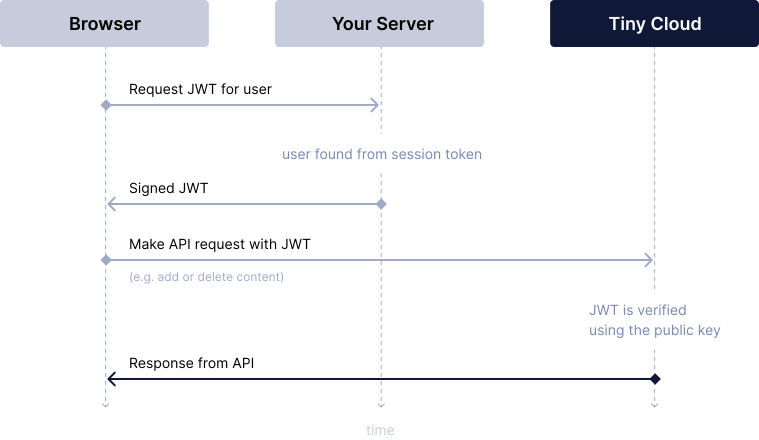
To authenticate users, TinyMCE AI uses tokens. The purpose of tokens is to inform the AI service that the user has access to AI features and which API key the user should connect to. The authenticity of tokens is provided by a digital signature.
The token endpoint is where TinyMCE makes a request to get the token. It is required to return the token only if the user proves their identity. It should be placed inside the system, not exposed as a public endpoint without proper authentication.
The following diagram shows how TinyMCE AI uses tokens:
The JSON Web Tokens Specification
TinyMCE AI tokens are represented as JSON Web Tokens (JWT). JWT is an open standard (RFC 7519) for transmitting digitally signed information. Using it ensures that the data comes from a trusted source and has not been tampered with.
A JWT consists of three parts separated by dots .
-
Header: Contains metadata about the token, including the signing algorithm
-
Payload: Contains the claims (user information, permissions, and similar)
-
Signature: Used to verify the token’s authenticity
{header}.{payload}.{signature}eyJhbGciOiJSUzI1NiIsInR5cCI6IkpXVCJ9.eyJzdWIiOiJ1c2VyLTQ4NzI5IiwibmFtZSI6Ikplc3NpY2EgV2lsbGlhbXMiLCJpYXQiOjE3Mjg0NzM2NDJ9.kX9mP2qL8vN4rT7wY3zA5bC6dE1fG2hI3jK4lM5nO6pQ7rS8tU9vW0xY1zA2bHeader
The JWT header identifies the token type and specifies the cryptographic algorithm used to sign the token. For TinyMCE AI, the header must be a JSON object containing:
-
alg: The signing algorithm used to create the token signature. See Supported Algorithms for the list of supported algorithms. Tiny recommends usingRS256. -
typ: The token type identifier, which must always beJWT
The header is Base64URL-encoded to form the first part of the JWT token.
{
  "alg": "RS256",
  "typ": "JWT"
}
Payload
The JWT payload is a JSON object containing claims that identify the user, specify their AI permissions, and control token validity. The payload is Base64URL-encoded to form the second part of the JWT token.
Payload Properties
The following properties must be included in the payload:
-
aud: The API key that has entitlements to use TinyMCE AI. -
sub: The user ID. This should be a unique identifier for the user making the request. This identifier is used to lock down conversation history, AI-generated content, and other user-specific data to individual users, ensuring privacy and data isolation. The user ID must not exceed 96 characters. -
iat: "Issued at". Ensureiatis present and contains a correct time stated in seconds. Some JWT implementations do not include it by default. Sometimes the system time may also be invalid, causing issues. -
exp: Token expiration time. Identifies the expiration time after which the JWT will not be accepted. TinyMCE AI only accepts tokens no older than 24 hours. This field can be used to shorten the token validity time. -
auth: Theauth.ai.permissionsarray inside is required. This defines which AI features the user can access. See Permissions below for details.
Every token returned during one editor session must carry the same sub and aud values as the first token. To switch to a different user or API key, reload the editor. See Changed sub or aud claims.
Each token must also meet these requirements, or the editor shows an error and the request is not sent:
-
It contains
sub,aud,iat,exp, and theauth.ai.permissionsarray. Otherwise, the error isInvalid JWT token payload. -
It is no more than two minutes past its
exptime. -
Its
iatandexptimes are no more than 24 hours in the past.
A token that fails either time check produces the error JWT token has expired.
The properties that are optional:
-
user: User information. Providingnameandemailis recommended for better user experience and debugging.
Example Token Payload
The example below presents a complete token payload:
{
  "aud": "no-api-key",
  "iat": 1511963669,
  "exp": 1511967269,
  "sub": "user-123",
  "user": {
    "email": "user@example.com",
    "name": "John Doe"
  },
  "auth": {
    "ai": {
      "permissions": [
        "ai:conversations:read",
        "ai:conversations:write",
        "ai:models:agent",
        "ai:actions:system:*",
        "ai:reviews:system:*"
      ]
    }
  }
}
Permissions
Permissions are specified in the auth.ai.permissions array within the JWT token and control which AI features, models, and capabilities users can access.
For a complete list of available permissions, permission examples, and best practices, see Permissions.
For complete details on all required claims, including types, formats, and implementation examples, see:
Signature
The signature is created by encoding the header and payload using Base64URL, then signing them with the private key using the specified algorithm. The TinyMCE AI service verifies the signature using the corresponding public key stored in the Tiny Account.
Supported Algorithms
TinyMCE does not support symmetrical encryption algorithms, such as HS256. Tiny recommends using the RS256 algorithm. The following algorithms are supported:
-
RS256
-
RS384
-
RS512
-
PS256
-
PS384
-
PS512
For details on each of these algorithms, visit: RFC 7518, JSON Web Algorithms (JWA) Section 3 - Cryptographic Algorithms for Digital Signatures and MACs.
Requests to the Token Endpoint
The token for TinyMCE AI is requested by the TinyMCE AI plugin. The easiest way to configure this is to set the tinymceai_token_provider option to a function that fetches the token from the endpoint.
The token endpoint will be requested:
-
At editor initialization
-
On the next request to the AI service once the current token is within 60 seconds of its
exptime
Simple Usage
tinymce.init({
  selector: 'textarea',
  plugins: 'tinymceai',
  toolbar: 'tinymceai-chat tinymceai-quickactions tinymceai-review',
  tinymceai_token_provider: () => {
    return fetch('http://localhost:3000/jwt', {
      method: 'POST',
      headers: { 'Content-Type': 'application/json' },
    }).then(response => response.json());
  },
});|
The first token is requested while the editor loads. If the token request fails, the editor still starts, an error notification appears, and TinyMCE AI requests fail until the token endpoint returns a valid token. |
Responses from the Token Endpoint
The token provider must return a Promise that resolves to an object with a token property: { token: string }. The plugin reports an error if the function does not return a Promise, or if the resolved value has no token string. The endpoint may respond in either format:
-
JSON response: Endpoint returns
{ "token": "eyJ..." }. Useresponse.json()and return{ token: data.token }. -
Plain text response: Endpoint returns the raw JWT string. Use
response.text()and return{ token }.
{
  "token": "eyJhbGciOiJSUzI1NiIsInR5cCI6IkpXVCJ9..."
}eyJhbGciOiJSUzI1NiIsInR5cCI6IkpXVCJ9...Quick Setup
To set up JWT authentication for TinyMCE AI:
-
Generate a public/private key pair and add the public key to the Tiny Account using Tiny Account - JWT Keys.
-
Set up a JWT endpoint that generates tokens with the required claims.
-
Configure TinyMCE to use the JWT endpoint through the
tinymceai_token_provideroption.
For step-by-step implementation instructions with complete code examples, see:
-
JWT authentication (Node.js): Complete Node.js implementation guide
-
JWT authentication (PHP): Complete PHP implementation guide
Tools
JWT tokens can be validated and debugged using the jwt.io debugger.
Troubleshooting
Invalid token
If an error message indicates an invalid token:
-
Verify that the token was created in accordance with the required claims and format
-
Ensure the API key in the
audclaim is correct and valid -
Verify that the token is signed with one of the supported algorithms
-
Check that the public key in the Tiny Account matches the private key used to sign the token
-
Validate the token structure using the jwt.io debugger
-
Check that the token has every required claim and has not expired, as described in Payload properties
-
Ensure the
iat(issued at) timestamp is correct and not in the future -
Verify that system time is accurate (time drift can cause token validation issues)
-
If the error code is
jwt-too-long, reduce the size of the claims
Insufficient permissions
If an error indicates insufficient permissions:
-
Verify that the token includes the
auth.ai.permissionsarray with the required permissions -
Check that the permissions match the AI features being accessed
-
Review the Permissions guide for the correct permission format
-
Ensure permissions are specified correctly (for example,
ai:conversations:read,ai:conversations:write) -
Add the scopes listed in the
data.missingPermissionsarray of the403missing-permissionsresponse
Changed sub or aud claims
If the plugin reports that the JWT token claims (sub or aud) have changed since the last token was issued, the token provider returned a token for a different user or API key during the same editor session. Return tokens with the same sub and aud for the whole session, or reload the editor after the user changes.
Error codes
For the error response shape, see Error responses. For the full list of error codes, see the API reference. The token-related fixes are in Invalid token and Insufficient permissions.
Related Features
-
Permissions: Complete permissions reference and examples.
-
AI Models: Model selection and capabilities.
-
Chat: Interactive AI discussions.
-
Review: Content improvement.
-
Quick Actions: Content transformation.
-
API Documentation: Complete API reference for TinyMCE AI.